
These are common features of many different databases: the ability to use AND, OR, and NOT to create a better search. The area shaded yellow shows you what kind of results you will get using the search terms "calcium" and "fatty acids".
|
AND: search terms must exist to be included. Gives fewer, but better, results.
|
|
|
OR: item must have at least one of the terms entered. Helpful when you have two similar terms, such as "sustainability" and "energy conservation".
|
|
|
NOT: search term cannot be part of an item to be displayed. Can help remove unwanted items from your results.
|
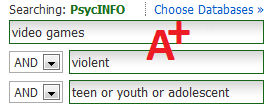
Use AND OR or NOT within the search boxes! When you have words like "teen" that have multiple synonyms, use the OR operator to search for any one of those words in the results.
This will expand your searches. If one author uses "teen", another uses "youth", and another uses "adolescent" - they'll all show up in this search.
 This guide is licensed under a Creative Commons Attribution-NonCommercial-ShareAlike 4.0 International License.


